Legally Binding • IT Act 2000 Compliant • UIDAI Verified
Upload & Sign Your PDF with Aadhaar eSign
Add the PDF that needs your signature
🎉 We listened to your feedback: Now supporting images (JPG, PNG) as well!
You can add multiple files.
How It Works
Mark Sign Spots
Upload a PDF. Choose who signs where.
Signing Fee
Pay a one-time fee to sign this document.
Sign with OTP
Verify with Aadhaar OTP and sign instantly
Common Questions
Pick a category, then expand a question for a quick answer.
- What do I need to sign a PDF online with Aadhaar eSign?
You need the PDF file and the signer’s mobile number (to send the private signing link via WhatsApp).
The signer will need their Aadhaar-linked mobile number handy to receive the final validation OTP from UIDAI.
- How long does it take to complete a signing?
It takes just minutes. Setting up the document is instant, and once signers receive the WhatsApp link, the Aadhaar OTP process typically takes only 1–2 minutes.
- Which PDFs are supported and is it secure?
We support standard PDF documents. A4 size pages are recommended for the best experience.
Security of your files is paramount - They are protected using best-in-class encryption, securely transferred, and are shared only with authorized signers using private links.
- How does the signature look on the PDF?
The signature appears as a professional digital block containing the signer’s name, timestamp, and a QR code for instant verification.
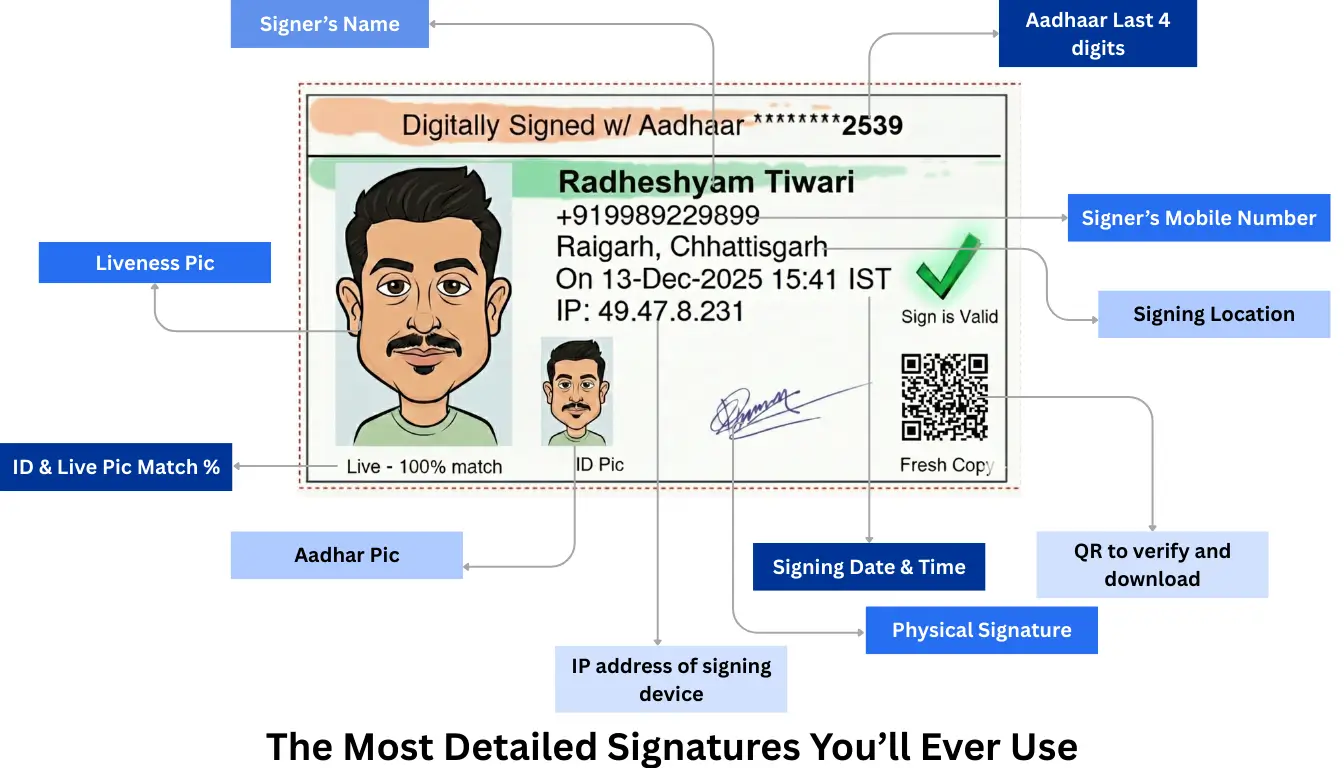
Unlike a handwritten scribble, this cryptographic signature guarantees the document hasn’t been tampered with.
- Is Aadhaar eSign legally valid in India?
Yes. Aadhaar eSign is recognized under the IT Act, 2000. It enjoys a presumption of validity—meaning it is assumed valid by default, unlike traditional signatures which must be proved in court.
- Are these signatures “court-ready”?
Absolutely. You receive a Court-Ready Audit Certificate that serves as primary evidence. It captures:
- Identity Proof (Aadhaar match, Live photo)
- Consent (Video recording option)
- Device & Location (IP, GPS, Browser)
- Cryptographic Integrity (Hash chaining)
- How is this better than handwritten signatures on a PDF?
Handwritten signatures are easily forged and offer no tamper evidence. OTPSign provides cryptographic integrity—any change after signing invalidates the document. Plus, options like AI face matching and video recording provide far superior proof of identity and intent.
- How is this better than a USB token / DSC (hardware digital signature)?
OTPSign is hardware-free. You don’t need a USB dongle, drivers, or a PC.
Feature DSC Token OTPSign Setup Drivers + USB Mobile Phone Time Days to procure Instant Location PC-dependent Anywhere - How can someone verify the signed PDF instantly?
Verification is instant:
- Open the PDF in Adobe Acrobat Reader to view the valid signature panel and certificate details.
- Scan the QR code embedded in the signature or audit trail to download a fresh original copy.
- What is an audit trail / audit certificate?
It is a digitally signed evidence record that proves who signed, when, and how. It includes:
- Signer Identity: Name, Masked Aadhaar, Photo.
- Technical Evidence: IP address, Device info, Location.
- Integrity: Hash chains proving no alterations occurred.
- How do I sign a document with multiple parties?
Simply upload the PDF and add signers. Each signer receives a private signing link on WhatsApp. Signers sign sequentially (one after another).
- Do signers need to create an account?
No. Signers do not need an account. They simply click the secure link sent to their WhatsApp and authenticate using Aadhaar OTP to sign.
- How will all parties receive the final signed document?
Unlike physical signing where originals are scarce, every signer gets an original digitally-signed PDF immediately after completion. No need for manual distribution.
- I didn’t receive the OTP. What should I do?
There are two OTPs involved:
- Login OTP (WhatsApp): Sent to initiate the document. Note: WhatsApp often silences this notification for privacy. Please open WhatsApp to find the code in your notification list or chat.
- Signing OTP (Aadhaar): Sent by UIDAI to the signer’s Aadhaar-linked mobile number. Sometimes, OTPs may be delayed due to Aadhaar server outages. If this happens, please try again after some time.
Please check the correct app and device for each code.
- The signature boxes look misaligned. How do I fix it?
Our interface uses an interactive drag-and-drop system. You can tap to resize the field (two sizes available). We recommend placing fields in blank spaces to avoid covering document text. If issues persist, try reloading at 100% zoom.
- What if a signer is unavailable?
Since the signing link is sent via WhatsApp, signers can sign remotely from anywhere. If they are completely unavailable, you may need to create a new request with a different signer if the legal requirement permits.
Why Choose Aadhaar eSign?
100% Legally Recognized
Legally recognized in India under IT Act 2000. UIDAI verified security.
Instant Verification
Verify documents instantly with embedded QR codes and Adobe Reader support.
AI-Powered Proofs
Capture live photos and video proof for undeniable identity verification.
Save Time & Cost
Eliminate travel and physical tokens. Sign efficiently from anywhere.
Tamper-Proof
Bank-grade security with multi-level encryption and IP/device tracking.
Original Copies
Every signer receives an original copy, maintaining document integrity.
Digital Signature powered by,


